
Buying a used iPhone can be a great way to get a premium device for less, but there is one question you should answer before discussing the price:
Is the iPhone actually original?
And “original” does not only mean that the phone has an Apple logo on the back.
A used iPhone could be genuine but have a replaced screen, battery, camera, or other component. It could also have an unclear registration status in Egypt or remain linked to the previous owner’s Apple Account.
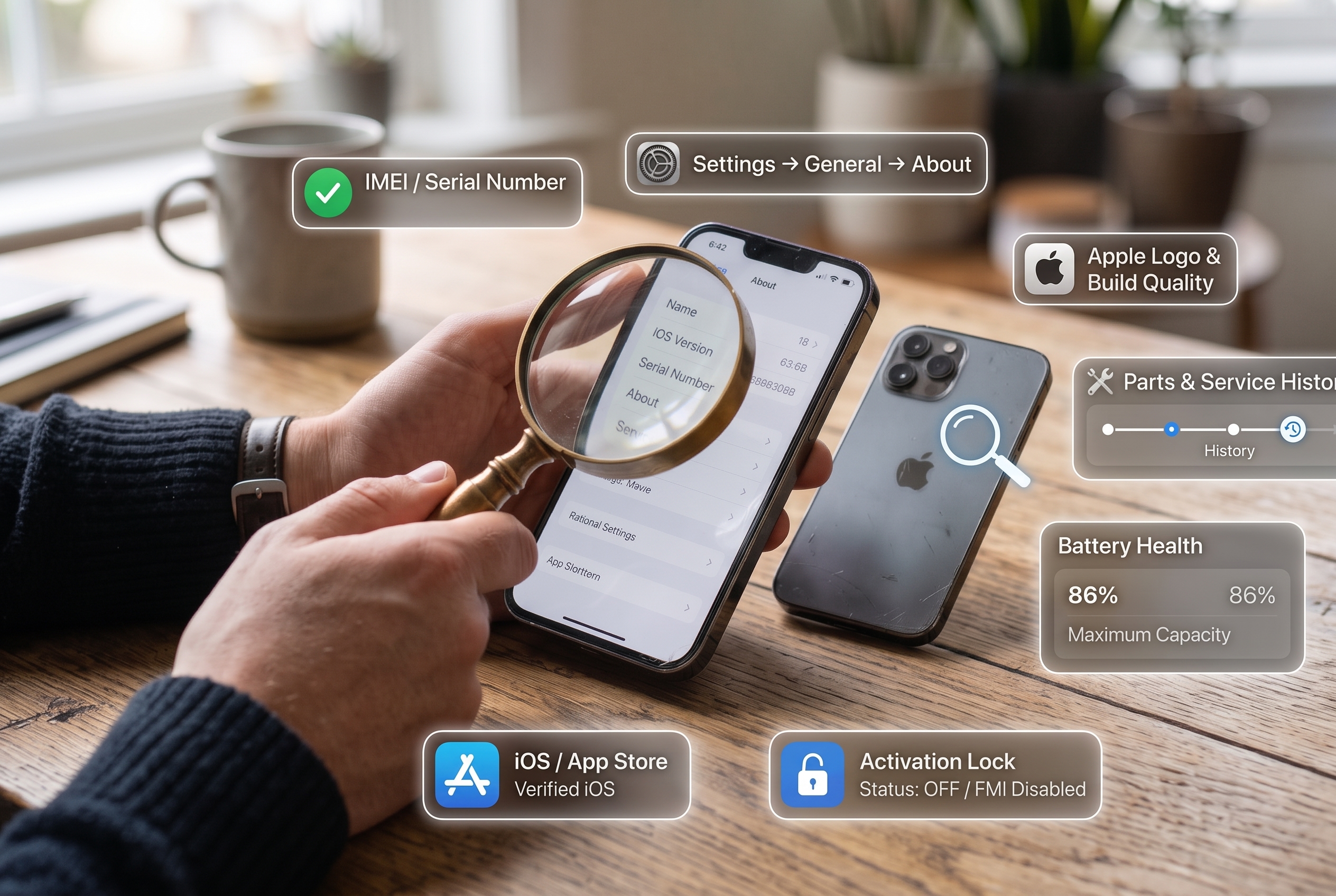
Before buying, you need to check the device, serial number, IMEI, parts, battery, Activation Lock, and registration status.
Here is a step-by-step guide to checking a used iPhone in Egypt.
How to Tell If a Used iPhone Is Original
There is no single visual trick that can guarantee a used iPhone is completely original.
Instead, combine several checks:
- Check the model and serial number.
- Verify the IMEI.
- Check Apple’s device information.
- Review Parts and Service History.
- Check the battery.
- Test the cameras, display, Face ID, speakers, and charging port.
- Check Activation Lock.
- Verify the phone’s Egyptian registration status.
- Compare the device information with the seller’s listing.
The more of these checks you complete, the easier it is to spot a questionable device.
1. Check the iPhone’s Model and Serial Number
Start with the phone itself.
Go to:
Settings → General → About
You should find information including:
- Model Name
- Model Number
- Serial Number
- IMEI
- Capacity
- iOS Version
Apple confirms that the serial number and IMEI can be found in the About section, as well as in other locations depending on the iPhone model.
Compare the information shown on the phone with any information provided by the seller.
If the details don’t match, stop and investigate before paying.
2. Check the IMEI
The IMEI is one of the most important numbers to check when buying a used iPhone in Egypt.
You can find it under:
Settings → General → About
You can also access the IMEI through other device information depending on the model.
The IMEI helps identify the specific mobile device and is particularly important in Egypt because imported phones need to comply with the country’s mobile-device registration requirements.
Don’t Just Check the IMEI — Check Its Egyptian Status
A phone can be a genuine Apple device and still have an issue with its registration in Egypt.
Apple’s Egypt support guidance states that if an iPhone purchased outside Egypt has an unregistered IMEI, the user may receive an NTRA alert. Imported devices have a 90-day grace period from activation of an Egyptian SIM card on the network to complete registration.
So when buying a used imported iPhone, original does not automatically mean fully cleared for use in Egypt.
3. Check Parts and Service History
This is one of the most useful checks when buying a used iPhone.
On supported models, go to:
Settings → General → About
If the iPhone has been repaired, you may see a section called Parts and Service History.
Apple says this section can identify repairs involving components such as:
- Battery
- Display
- Logic board
- Front camera
- Rear cameras
depending on the iPhone model.
What Do the Messages Mean?
You may see different labels next to a component.
Genuine
This indicates the repair used a genuine Apple part and Apple’s genuine repair processes.
Used
The component was previously used or installed in another iPhone.
Unknown
This can indicate that the component is not genuine, has not been properly verified, is not functioning as expected, or has another issue preventing verification.
This doesn’t necessarily mean the entire iPhone is fake.
It means you should understand what has been replaced and why before deciding what the phone is worth.
4. Check the Battery
Battery health is especially important when buying a used iPhone.
Go to:
Settings → Battery → Battery Health & Charging
Check the maximum capacity and look for any service warnings.
Apple also allows users to see battery-related information in Parts and Service History on supported models. A genuine replacement battery can be identified there, while an unverified battery may generate an “Unknown” message.
Why Does Battery Health Matter?
A used iPhone with excellent battery health can be worth more than the same model with a heavily degraded battery.
If the battery needs replacing soon, factor that potential cost into the price you’re willing to pay.
5. Check the Display
A replacement display doesn’t automatically mean you should reject a used iPhone.
But you should know whether the screen has been replaced and what type of component was used.
Check:
- Brightness.
- Touch response.
- Dead pixels.
- Cracks.
- Scratches.
- Color consistency.
- Face ID.
- Any display warnings.
Apple notes that supported iPhone models can show display replacement information through Parts and Service History.
A phone advertised as “all original” should be questioned if its service history shows a replacement component.
6. Test the Cameras
Don’t assume the cameras work simply because the camera app opens.
Test every camera available on the specific model.
Try:
- Main camera.
- Ultra Wide camera.
- Telephoto camera.
- Front camera.
- Portrait mode.
- Video recording.
- Flash.
- Autofocus.
Take photos at different distances and check them carefully.
Look for:
- Blurry images.
- Focus problems.
- Unusual spots.
- Camera shaking.
- Strange colors.
- Error messages.
If a camera has been replaced, the Parts and Service History may provide additional information depending on the model.
7. Test Face ID
Face ID is another feature you should test before buying.
Set it up or ask the seller to demonstrate that it works correctly.
Don’t ignore Face ID problems simply because everything else on the phone appears fine.
A used iPhone should be tested as a complete device rather than judged only by its appearance.
8. Check the Charging Port
Connect a compatible charging cable and make sure the phone charges normally.
Also inspect the port for:
- Dirt.
- Damage.
- Loose connections.
- Signs of corrosion.
If possible, test charging for several minutes rather than plugging it in for a few seconds.
9. Test the Speakers and Microphones
Play a video or song and listen to the speakers.
Then test:
- Main microphone.
- Voice recording.
- Phone call audio.
- Speakerphone.
- Earpiece.
Distorted audio or microphone problems can indicate previous damage or hardware issues.
10. Check for Activation Lock
This is one of the most important checks before buying a used iPhone.
Never buy an iPhone that is still linked to the previous owner’s Apple Account.
Apple says that if you see “iPhone Locked to Owner”, you should not take ownership of the device.
The seller should erase the device and remove it from their account before you complete the purchase.
What Should You See?
Ideally, after the seller has erased the device, you should see the Hello setup screen.
You can begin the setup process to confirm that the phone is not asking for the previous owner’s Apple Account information.
If the phone asks for the previous owner’s credentials, don’t complete the transaction until the seller removes the device from their account.
11. Check the iPhone’s Registration Status in Egypt
This is particularly important for imported used iPhones.
An iPhone can be:
Genuine Apple device + properly working + not properly registered in Egypt
These are separate issues.
Apple’s Egypt support page explains that iPhones purchased through Apple-authorized channels in Egypt have their IMEI registered on the buyer’s behalf, while imported devices may need registration through the Egyptian system.
If you’re buying a used imported iPhone, verify its registration status before paying.
12. Ask for the Original Invoice
If the seller has the original invoice, ask to see it.
An invoice can help you understand:
- Where the phone was purchased.
- When it was purchased.
- The original model.
- Whether it was purchased through an authorized channel.
- Whether there is remaining warranty coverage.
In Egypt, Apple also advises buyers who purchase an iPhone locally to make sure they receive an e-invoice.
An invoice alone does not prove that a used phone is completely original, but it can provide useful supporting information.
13. Compare the Phone With the Seller’s Description
Before meeting the seller, save the listing details.
Then compare the actual phone with what was advertised.
For example, if the listing says:
iPhone 16 Pro — 256GB — 95% Battery Health — Never Opened
check all four claims.
If the phone shows a different storage capacity or Parts and Service History reveals repairs, ask the seller about the difference before continuing.
14. Be Careful With “Brand New” Used iPhones
One common mistake is assuming that a phone that looks new is necessarily unused.
A phone can have:
- A very clean exterior.
- A replacement screen.
- A replacement battery.
- A replaced back glass.
- Repaired internal components.
That’s why software-based checks are just as important as physical inspection.
Used iPhone Buying Checklist for Egypt
Before handing over your money, go through this checklist:
Device Information
- Model matches the listing.
- Storage matches the listing.
- Serial number is available.
- IMEI is available.
- IMEI information is consistent.
Apple Account
- Find My is disabled.
- Previous owner’s Apple Account is removed.
- Activation Lock is not enabled.
- Phone can be activated normally.
Hardware
- Screen works correctly.
- Cameras work.
- Face ID works.
- Speakers work.
- Microphones work.
- Charging works.
- Buttons work.
Battery
- Battery health checked.
- No unexpected battery warnings.
- Battery replacement history checked.
Parts
- Parts and Service History checked.
- Any replaced components are understood.
- Unknown or unverified parts investigated.
Egypt Registration
- IMEI registration status checked.
- Applicable fees are understood.
- Seller provides relevant documentation where available.
Final Thoughts
So, how do you check if a used iPhone is original before buying it in Egypt?
Don’t rely on the Apple logo, the box, or how new the phone looks.
Check the model, serial number, IMEI, Parts and Service History, battery health, Activation Lock, hardware, and Egyptian registration status.
Most importantly, remember that a genuine iPhone and a fully original, unrepaired iPhone are not necessarily the same thing. A genuine Apple device can have replacement components, and Apple’s own system can help you identify some of them.
Take your time, test the phone in person, and make sure its status matches the seller’s description before paying.
Looking for a used iPhone in Egypt? Browse listings on dubizzle, compare your options, and use this checklist before making a purchase.
Read Next